Get Started in 5 Steps
Follow the steps below to complete the full flow from registration to weekly review in 5 minutes. Each step has a screenshot, just follow along.
Get Started in 5 Steps
Follow the steps below to complete the full flow from registration to weekly review in 5 minutes.
Getting Started
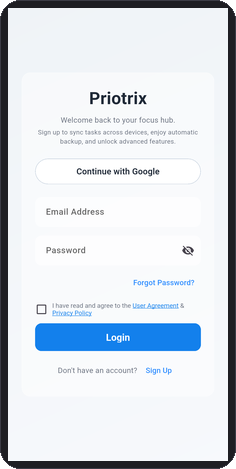
Create Account
Open the app, enter your email and password, tap Register. No verification needed, enter immediately.
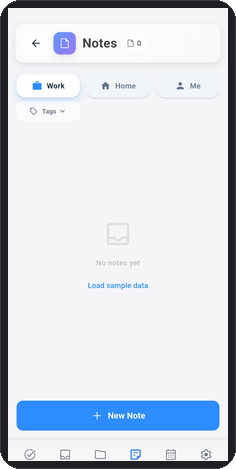
Create First Note
Tap the + button at bottom right, select "Note", enter what you want to record, tap Save.
Advanced Actions
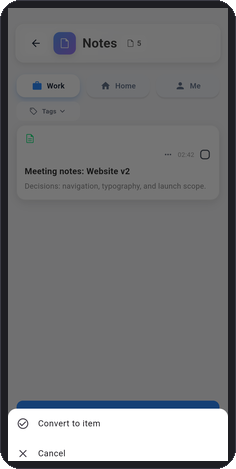
Convert Note to Item
On the Notes list, tap the three-dot menu on the top right of a note card, then tap "Convert to Item" from the bottom sheet.
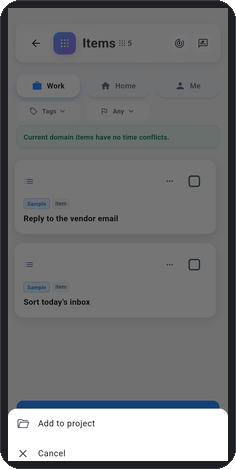
Upgrade Item to Project
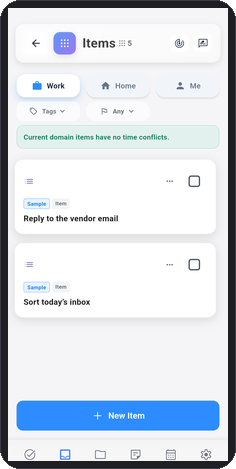
On the Items list, tap the three-dot menu on the top right of an item card, then tap "Upgrade to Project" from the bottom sheet.
Review & Insights
View Today's Todos
Tap the Items tab to see all tasks you need to complete today, start working efficiently.
Ready to get started?
Download Priotrix, complete registration and start using it in 5 minutes.